


Photo Credit Above Panoramic Daisy Picture - "Blumen im Sommer" by Maximilian Schönherr - Own work. Licensed under CC BY-SA 3.0 via Commons - https://commons.wikimedia.org/wiki/File:Blumen_im_Sommer.jpg#/media/File:Blumen_im_Sommer.jpg
Aperture – Photography for the Beginner
Aperture Basics
Understanding Aperture
Aperture – the f-number (sometimes called f-stop) is often used in photography to obtain the depth of field (DOF). Depth of field is the amount of the image in focus from the subject to the background.
Aperture is fundamental to understanding to take pictures without using auto mode. Aperture is one of the three basics you must master. The aperture in photography refers to the size of the lens opening when the picture is taken. The only thing you need to worry about right now is this general rule.
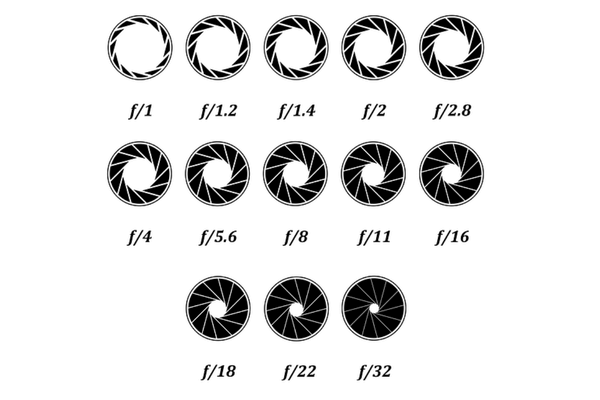
Aperture – F2.8 a is considered wide open and lets a lot of light into the camera and blurs the background. (shallow depth of field)
Aperture – F22 lets much less light into the camera and keeps everything focused. All the numbers in between will step you up toward the other end. F8 or F11 is the mid-range.
Shooting in Aperture Priority Mode
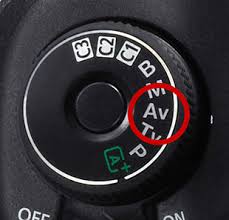
Aperture Priority Mode is a semi-automatic mode on your camera. It is A mode or AV mode (aperture value mode). Typical ranges of apertures used in photography are about f/2.8–f/22. Some cameras will have the A or AV on the wheel on top of the camera settings. For newer cameras, you can change the setting in the digital menu sometimes on the top of the camera. This info will be at the beginning of your manual if you need to refer to it.
To take a photo with the correct exposure, one must understand how to use the aperture, shutter speed and ISO settings together.
If you use the “aperture priority” mode, you will determine what aperture setting you desire, as that is your top priority; after which, the camera will select an appropriate shutter speed for correct exposure. When in shutter priority, you choose the shutter speed, it is your priority, and the camera picks the aperture.
These are the two main settings to shoot in. Manual mode is generally used when the lighting is controlled and constant, like in a studio or at night.
Understanding depth of field (DOF) is essential for mastering photography basics. DOF refers to how much of the background area behind the subject is in focus. A large aperture, like f2.8, brings the subject into sharp focus but blurs everything else. To keep it straight, remember that wide open means a smaller number–it might seem counterintuitive, but once you get used to it, everything will make sense.
General Aperture Rule to Memorize
f 2.8 means 2.8 feet will be in focus. F22 – 22 feet will be in focus. This is not entirely accurate. It’s just a trick to remember which way blurs and which way focuses. f2.8 blurs and f22 focuses.
If you set the aperture to a high number (f22), most of the frame will be clear, including the background and foreground.
If you are taking a class picture, you will want to use an aperture of at least f8 to ensure all student rows stay focused, but the background blurs some. This is a perfect example of increasing depth of field. If y u used f2.8 instead, only one row of kids would remain sharp while everything behind them would become blurry, including the other students. In t ese circumstances, having a higher f-stop number is critical to getting more depth of field, hence everyone in focus.
For this concept to make sense quickly, do your homework. Unde standing reading material requires repetition and lessons, which helps it sink into muscle memory. I us ally spend around an hour teaching and practicing this concept in my classes so that it sticks.
Depth of field and appropriate use of camera every photographer should master. It i important to remember these concepts when taking photographs when not in auto mode, which is behind you now. Chal enge yourself by not going back to auto mode.
Aperture Tip:
The photo was taken with an aperture of f2.8 to create a completely blurred background. Reme ber, when you think wide open means f22 or a high number, It is backward. A wi e-open aperture means your lowest f-number, like 2.8. A cl sed aperture is F-22
When shooting in Aperture Priority, we prioritize controlling the depth of field. The amera will then pick the shutter speed to ensure the exposure is correct.
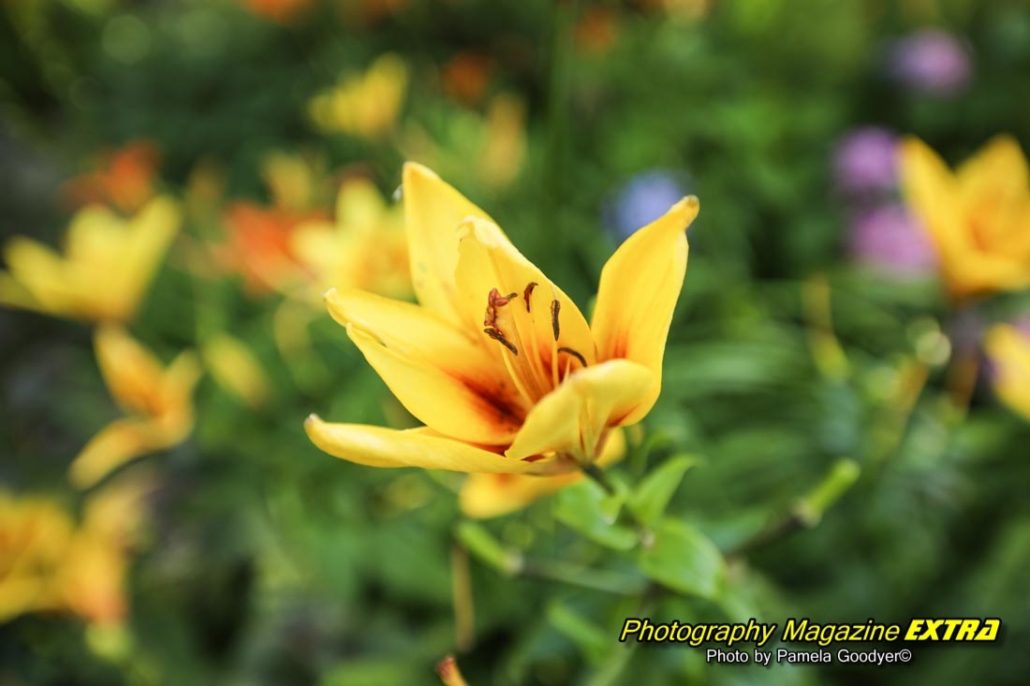
Aperture Priority Blurs the Background
The photo was taken with an aperture of f2.8 to create a completely blurred background. Remember, when you think wide open means f22 or a high number (which common sense leads you to think), It is backward. A wide-open aperture means your lowest f-number.
When shooting in Aperture Priority, our priority is controlling the depth of field. The camera will then pick the shutter speed to ensure the exposure is correct.
Aperture Priority Learning
Aperture Priority Homework
Put your camera in A or A/V for the aperture priority setting. Use ISO 1600. Do your homework outside with a lot of light. This will make things easier. Set your white balance to match your surroundings, sun, clouds, etc. Take the same shot at 2.8, then 3.5, 4.0, and 5.6 up to f22. Download your images into your editing software and look at the metadata to see what you shot and the photo differences.
Lightroom is a great editing tool for seeing metadata. We do not believe in anything with monthly subscriptions since we will be doing photography until we die and will live to be 102 or more. That would mean at twenty dollars a month = 240 per year x 50 years = $12,000. We use what is available for download. We like Photo Impact Pro and use it for almost everything. You can try to find a used lightroom classic CD, download it on your computer, and avoid the lifetime monthly fees for as long as Lightroom Classic still works on newer computers.